You’re heading out the door, coffee in one hand, phone in the other, and suddenly your smart lock stops responding. No warning. No backup plan. Just a dead smart lock battery and a locked door standing between you and your day. It’s frustrating, and it always seems to happen at the worst time.
Many homeowners in South Pasadena rely on smart locks for convenience and security, but very few think about battery life until something goes wrong. The reality is simple: your smart lock battery works every day behind the scenes, and when it fails, it can disrupt your entire routine.
The good news is that most battery issues are preventable with the right habits and maintenance.
Short Summary
A smart lock battery typically lasts between 3 months and 1 year depending on usage, connectivity type, and environment. Wi-Fi locks drain faster, while Bluetooth models last longer. Simple habits like firmware updates and proper installation can significantly extend battery life and prevent lockouts.
What Affects Smart Lock Battery Performance?
The lifespan of a smart lock battery depends on how the device is used and how it is built. Some homes experience faster battery drain because of heavy usage or constant connectivity.
Smart Lock Battery Usage and Activity Levels
Every time you lock or unlock your door, the system activates motors and sensors. These small actions add up over time.
Homes with frequent activity often see faster battery drain, especially when multiple users are involved.
Ask yourself:
- How many times a day is the lock used?
- Are multiple people accessing the home?
- Are guest codes used often?
More activity means higher energy use.
Wi-Fi vs Bluetooth Smart Lock Battery Drain
Connectivity plays a major role in smart lock battery life.
Wi-Fi locks stay connected continuously. This allows remote control but uses more energy. Bluetooth locks only connect when needed, which saves power.
In most cases:
- Wi-Fi locks drain faster
- Bluetooth locks last longer
- Hybrid systems fall in between
Choosing the right system can improve battery efficiency significantly.
Temperature and Environmental Impact on Smart Lock Battery
The weather in South Pasadena affects battery chemistry more than most homeowners realize.
Cold temperatures slow down chemical reactions inside the battery. Heat speeds up wear and reduces lifespan over time.
Outdoor doors exposed to direct sunlight, cold wind, and humidity will usually experience faster smart lock battery drain.
Warning Signs of a Weak Smart Lock Battery
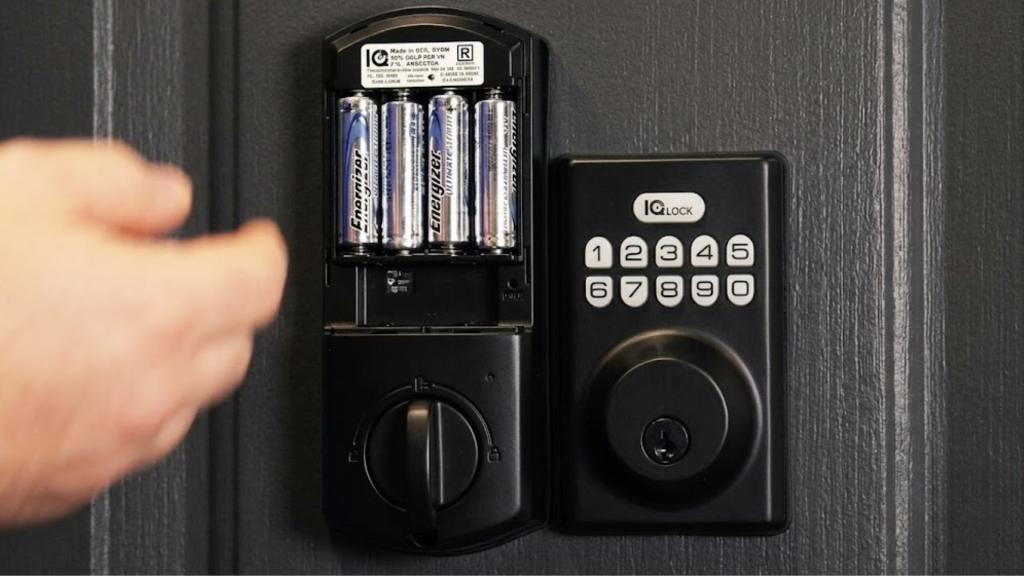
Recognizing early warning signs can help you avoid unexpected lockouts and keep your smart lock functioning reliably. Pay attention to these common indicators:
- Slower response times when locking or unlocking
- Repeated low battery notifications from the app or device
- Delays or lag when using the mobile app
- Inconsistent locking or unlocking behavior
- Intermittent connection or syncing issues
If you notice one or more of these signs, it’s a good idea to replace the batteries soon to maintain smooth operation and security.
When to Replace Smart Lock Batteries
Knowing when to replace your smart lock batteries can help you avoid unexpected lockouts and maintain consistent performance. While most locks provide low-battery warnings, it’s best not to wait until the last moment. The table below outlines common scenarios, causes, and solutions to help you better understand battery replacement timing and its impact.
| Smart Lock Type | Typical Lifespan | Notes |
|---|---|---|
| Bluetooth | 6–12 months | Longer lifespan due to lower energy usage |
| Wi-Fi | 3–6 months | Drains faster because of constant connectivity |
| High Traffic Homes | Shorter lifespan | Frequent use reduces battery life significantly |
Replacing batteries early helps prevent unexpected lockouts and ensures consistent performance.
Smart Lock Troubleshooting Before Battery Replacement
Before replacing your smart lock battery, take a few minutes to check for common issues that may be causing poor performance. Often, simple fixes can restore normal operation without needing new batteries.
Check the following:
- Battery placement: Ensure batteries are inserted correctly and making proper contact
- Corrosion or dust: Clean any buildup that may interfere with power flow
- Door alignment: Make sure the lock isn’t straining due to misalignment
- Firmware updates: Install the latest updates for improved efficiency
- Signal strength: Verify a stable connection to reduce unnecessary battery drain
Choosing the Best Smart Lock Battery Type
Not all batteries deliver the same performance in a smart lock, and selecting the right type can make a noticeable difference in reliability and lifespan.
Here are the most common options:
- Alkaline batteries: Affordable and widely available, but they tend to drain faster and may struggle in extreme temperatures
- Lithium batteries: Longer-lasting, more stable, and better suited for both hot and cold environments
- Rechargeable NiMH batteries: Environmentally friendly, but they can provide inconsistent voltage and may require more frequent charging
For most homeowners, lithium batteries are the best choice. They offer consistent power output, handle temperature changes well, and help extend overall smart lock battery life with fewer interruptions.
How to Extend Smart Lock Battery Life
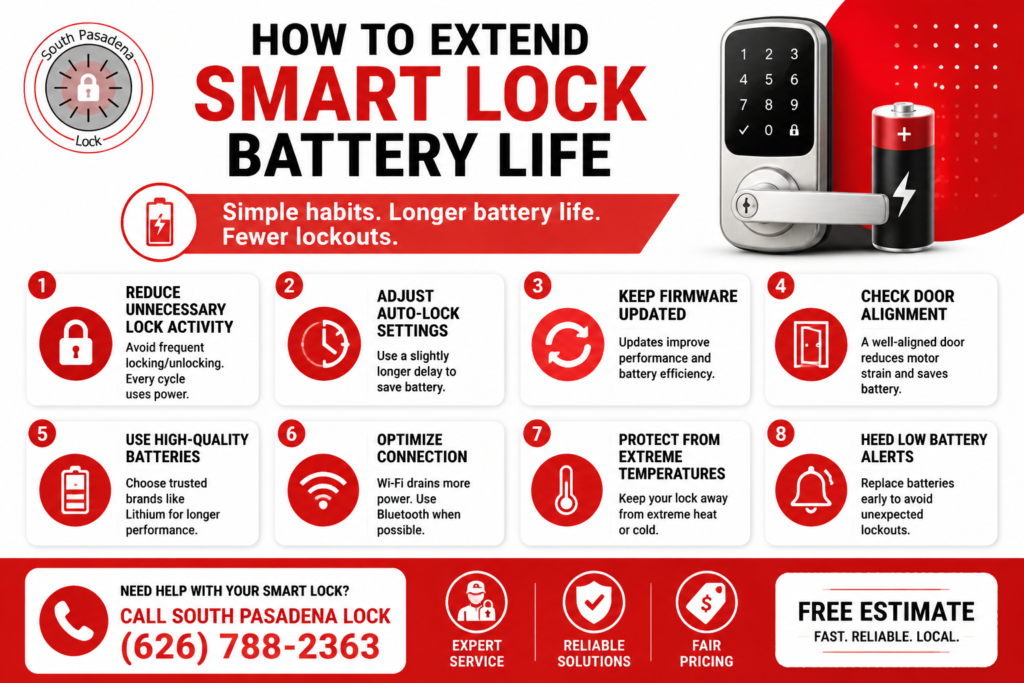
If you want your smart lock to stay reliable and avoid sudden failures, focusing on battery efficiency is essential. The good news is that you don’t need complicated tools or technical skills—just a few smart habits can make a noticeable difference.
1. Reduce Excess Smart Lock Activity
Every lock and unlock cycle uses power. While each action seems small, frequent use adds up quickly.
To minimize unnecessary battery drain:
- Avoid repeatedly testing the lock unless needed
- Limit excessive app commands throughout the day
- Reduce repeated manual locking and unlocking
Being mindful of how often the lock is activated can significantly extend battery life over time.
2. Optimize Auto-Lock Settings
Auto-lock is a useful feature, but overly short timers can cause the lock to engage more often than necessary.
Try adjusting the delay to better match your routine. A slightly longer auto-lock interval reduces the number of cycles, helping conserve battery without sacrificing security.
3. Keep Firmware Updated
Manufacturers regularly release updates that improve performance and efficiency.
Keeping your smart lock firmware up to date ensures:
- Better battery management
- Improved connectivity
- Fewer system glitches
Regular updates can quietly extend battery life without any extra effort.
4. Ensure Proper Door Alignment
If your door doesn’t align properly with the lock, the motor has to work harder to engage the bolt. This extra strain increases power consumption.
Check that:
- The latch moves smoothly
- The door closes without resistance
- The strike plate is properly aligned
Fixing alignment issues can reduce unnecessary battery drain and improve overall lock performance.
4. Use High-Quality Smart Lock Batteries
Not all batteries perform equally in smart locks. Choosing the right type makes a big difference.
For best results:
- Use trusted, high-quality brands
- Replace all batteries at the same time
- Consider lithium batteries for longer lifespan and stable performance
Reliable batteries ensure consistent power delivery and help prevent unexpected lockouts.
FAQs: Smart Lock Battery
Can I use rechargeable batteries in my smart lock?
Yes, you can use rechargeable batteries in some smart locks, but it depends on the manufacturer’s recommendations. Many smart locks are designed to work best with alkaline or lithium batteries because they provide a steady voltage.
Why does battery drain increase after updates?
Battery drain may increase after a firmware update because the smart lock’s software has been modified to improve security, connectivity, or performance. New features or background processes can require more power.
Does Bluetooth disconnection affect battery life?
Yes, frequent Bluetooth disconnections can impact smart lock battery life. When the lock repeatedly tries to reconnect to your phone or hub, it uses additional power.
Can I mix battery brands?
No, mixing different battery brands or types is not recommended for smart locks. Different batteries can have varying voltage levels and discharge rates, which can lead to inconsistent performance, faster battery drain, or even damage to the lock.
Should I remove batteries when not using the lock?
Yes, if you plan to leave your smart lock unused for an extended period, removing the batteries can help prevent corrosion and preserve battery life.
Conclusion
Smart lock battery performance depends on usage, environment, and maintenance habits. Small improvements can significantly extend lifespan and prevent unexpected failures.
Proper care ensures your smart lock stays reliable and your home remains secure.
Smart Lock Battery Replacement & Repair Services in South Pasadena
If your smart lock battery is draining too fast or causing issues, South Pasadena Lock is ready to help restore your security and convenience quickly.
Call (626) 788-2363 today for fast, reliable service and request your Free Estimate for professional smart lock battery replacement, troubleshooting, and repair.
 South Pasadena Locksmith is a locally owned and operated locksmith service company that provide fast and professional locksmith service to the residents of South Pasadena and the near by communities like: Pasadena, Altadena, Glendale, Alhambra, Monterey Park, Rosemead along side many others..